Device Types
Introduction
The Device Types in the system are used with the event notification options configured in the monitoring tab of the controller, panel, reader or monitor point (input). The Device Types are user-definable groupings of sensor inputs or readers each with their own description, priority, and event type options. When a new event is received that has acknowledgment enabled, the event is displayed in the pending event notification dialog box in a priority ranking based on its device type. Each device types has a priority setting (0-99), a sound file selection and a sound repeat option is also available for each event type. There are many sample sounds which can be found in the C:\Keri\DoorsNET\Sounds directory in a .WAV format - you can also add your own sounds to this folder.
As well as being ranked by the device type priority they are also ranked by the event type (in the following order: alarm types, trouble types, mask types, clear types), then by the priority of the individual sensor and then sorted for the oldest event).
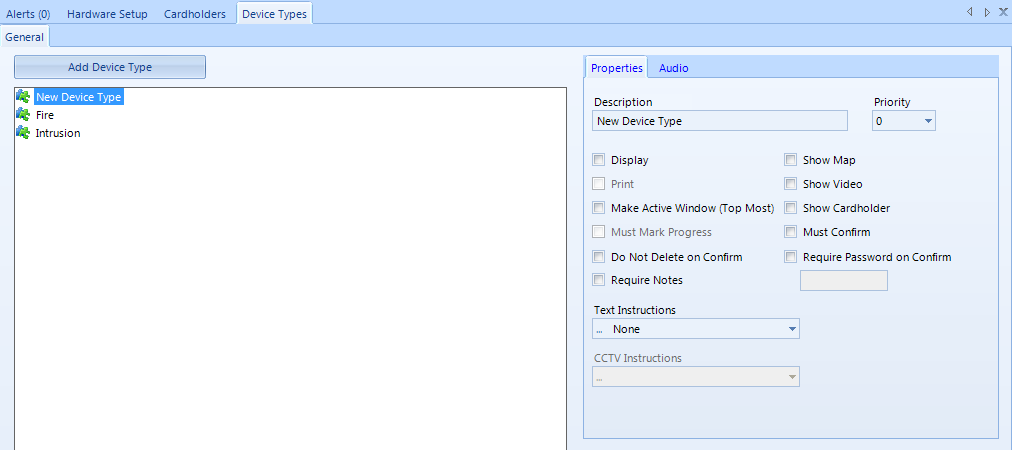
To add a new Device Type, click the 'Add Device Type' button.
Properties
- Description allows the user to change the name of the device type from the default name and can accept any character up to a maximum length of 50 characters.
- Priority sets the priority for event notification for this device type. The range is from 0 to 99 with 0 being the highest priority.
- Display enables or disables the displaying of the selected device type in the pending Alerts window.
- Make Active Window (Top Most) - Allows you to configure alerts as Pop-Up Alerts. When an alert is created Doors.NET will become the top-most application on the PC and in addition, the alerts grid will come to the front of the User Interface (for example) if you are on the hardware setup or cardholders page (or even if the alerts grid has been closed).
- Do Not Delete on Confirm applies to certain event types that have an opposite event type. For example, a Monitor Point Alarm event has a reset of Monitor Point Secure event. In those cases, where the event type being confirmed has a reset event, the event will be marked as Confirmed and not automatically closed. The event will only be closed when the reset event itself is confirmed. Events that do not have a reset event from the selected device type are closed immediately. Any of the Access Denied or Access Granted events do not have a reset event associated with them and as such are closed upon confirmation.
- Require Notes enables or disables the requirement for the operator to enter a note when confirming the event. The note must be at least 3 characters in length. When enabled the operator cannot confirm the event until a note has been entered.
- Show Video displays the live video of the associated network camera.
- Show Cardholder displays the photo of the cardholder when access events are displayed. This is used in conjunction with the Photo Recall settings found in System Options.
- Must Confirm requires the operator to confirm the event before it can be closed.
- Require Password on Confirm enables the password confirmation option. The operator will be required to enter the correct password for the selected device type before the confirm button is enabled. Note that the password is per device type and is not related to the login password or Windows password in any way. The length of the password can be up to 16 characters.
- Text Instructions is a list of the available instructions that will be presented to the operator when they are working with an event. You can add, modify, or remove the list of text instructions by clicking the editor button in the drop down. Each instruction can be up to 8,000 characters.
- CCTV Instructions is a list of ASCII characters that will be sent to the local CCTV service for controlling analog switchers.
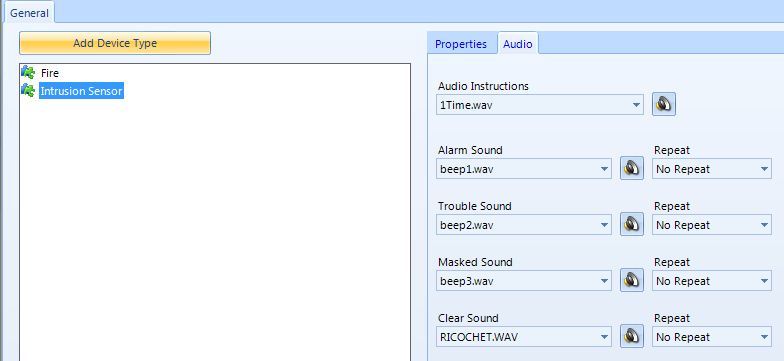
Audio
- Audio Instructions lists the .wav files installed in the DoorsNET/Sounds directory. You can add your own custom sounds to that directory. This file is available to the operator when working with an event from the selected device type and allows Sound Alerts to be created.
- Alarm Sound lists the .wav files installed in the DoorsNET/Sounds directory. You can add your own custom sounds to that directory. The selected file will be played when the type of event occurs and the acknowledgement of that event is required.
- Repeat plays the sound file once (no repeat) or at the specified interval until the event type is acknowledged or superseded by a higher priority event.