NXT-MSC Internal Configuration
1.0 Introduction
Effective from Doors.NET v4.0.3 it is now possible to make various controller configuration changes within Doors.NET rather than via a web browser. This section explains how to access the controller internal configuration and which configuration options can be changed within Doors.NET.
2.0 Access Controller Internal Configuration Options
- Log into Doors.NET (the default user name and password are both admin).
- Enable Design Mode by clicking the design mode icon: - the title bar will state Doors.NET [Design Mode].
- Go to Setup >> Hardware Setup >> All to display the hardware tree.
- Right click on an NXT-MSC controller on the hardware tree and select: 'Internal Controller Configuration'.

- Select one of the available configuration web pages from the Web Page pull-down menu.
- Then click the refresh button.
- The appropriate controller settings will then appear on the right-side of the window. Any settings which are not grayed-out can be edited.
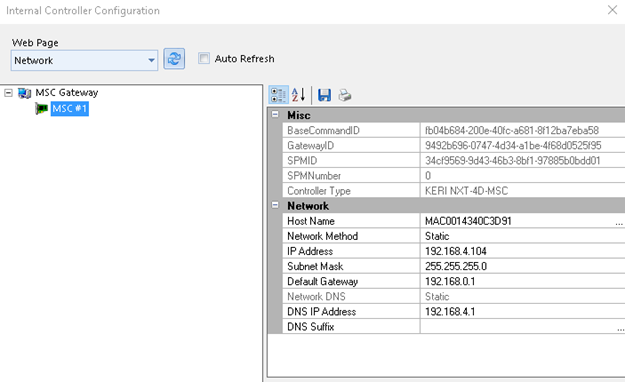
3.0 Controller Network Settings
These are the controller network settings that can be adjusted:
- Host Name - this is the host description for the controller. By default it displays the controller's MAC address.
- Network Method - The controller IP address can either be static or set to DHCP.
- IP Address - This is the IP address that is assigned to the controller.
- Subnet Mask - The Subnet Mask for the controller.
- Default Gateway - The default Gateway IP address for the controller.
4.0 Session Settings
- Password Strength - Configures the minimum password strength for the controller.
- Session Timeout - Configures the web session timeout value for this controller.
5.0 Web Connection Settings
- Diagnostic Logging - Select this option to create diagnostic information that will be written to the debug file every 15 minutes (or when the MSC gateway service is restarted.
- Disable Default User - Allows you to disable the default admin/password account.
- Door Forced Filter - Enable/disable filtering of door-forced events for this controller.
- SNMP - Enable/Disable the SNMP setting for this controller
- Web Server - Enables/Disables the Web Server for this controller
- Zeroconf Discover - Enables/Disables the Zeroconf discovery for this controller (used when scanning for NXT-MSC controllers.
6.0 Auto Save Settings
- Auto Save - Enable/disablethe controller automatically saving settings when a configuration change is detected.
- Delay before Save - Specifies how much time to wait after host configuration change before starting the save. The timer can be specified between 30 seconds and 30 minutes.
- Restore - Restore the controller from its last saved settings. If disabled, the controller will clear its current configuration and it will force a full download. This is the most secure option - For most systems the recommendation is for Restore to be enabled.